Project
Celestial Sphere
Abstract: An interactive web application for practicing and learning spherical geometry, designed for students and educators studying astronomy and spherical coordinates.
| Period | May 2025 |
|---|---|
| Duration | under a month |
| Status | Complete |
| Built with | Rust, Dioxus, WebAssembly, Spherical Geometry, CSS |
| Available at | bunchofcellulose.github.io/celestialsphere github.com/bunchofcellulose/celestialsphere |
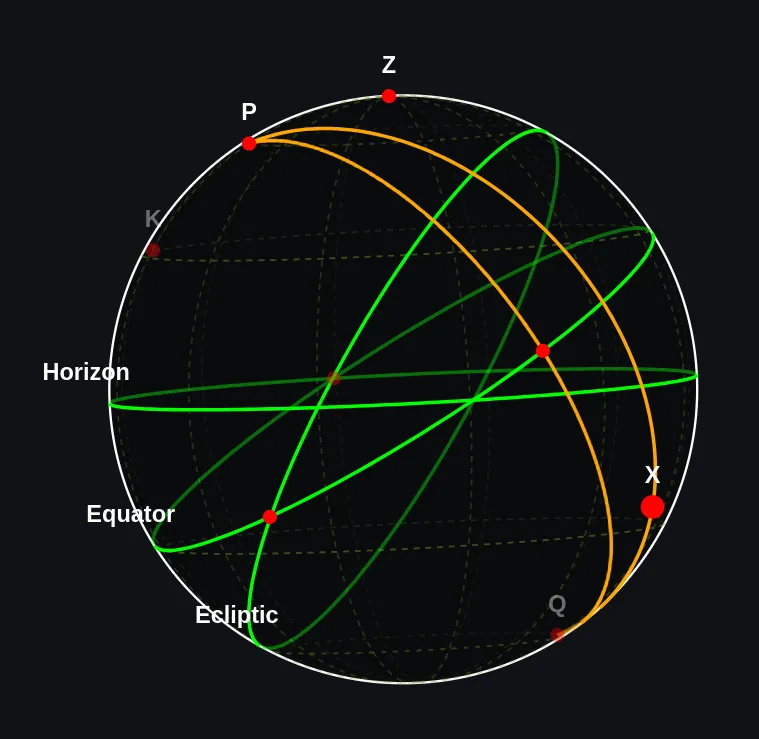
Overview
Celestial Sphere is an interactive web application that provides a neat and user-friendly interface for drawing and visualizing diagrams on a sphere. The tool is specifically designed to help students and educators easily learn and engage with spherical diagrams, which are commonly used in spherical astronomy, geometry, and coordinate systems.
Core Features
Interactive Point & Shape Management
- Add Points: Left-click on the sphere to add points
- Select & Deselect: Click points to select/deselect or use Shift+Click for multiple selections
- Move Points: Drag selected points across the sphere
- Rename Points: Type to name selected points
- Delete Points: Remove unwanted points with Delete key
- Hide/Show Points: Toggle visibility with Ctrl+H without losing data
Geometric Construction Tools
- Great Circles: Draw great circles with a selected point as the pole (
.key) or with 2 selected points (Shift+.) - Small Circles: Create small circles through 3 selected points (
,key) or with a pole and point (Shift+,) - Arcs: Connect points with great circle arcs by right-clicking between selected points
- Diametrically Opposite Points: Generate the opposite point on the sphere (
/key) - Point Snapping: Snap points onto nearby circles (Shift+drag)
Advanced Controls
- Grouping: Organize points into groups (Ctrl+G) for easier manipulation
- Properties Display: View coordinates of selected points and geometric properties
- Locked Points: Mark points as non-movable or non-removable
- Triangle Properties: View properties of triangles formed by 3 selected points
- Circle Properties: Inspect great circle and small circle parameters when selected
Visualization & Navigation
- Coordinate Grid: Toggle on/off for reference
- Zoom Control: Mouse wheel or slider (50%-200% range)
- Rotation Control:
- Middle mouse button to drag and rotate
- Sliders for precise x, y, z axis rotation (Ctrl+A, Ctrl+S, Ctrl+D)
- Pan & Zoom: Intuitive controls for exploring complex diagrams
File Management
- Save Diagrams: Export as .json files for later editing or sharing
- SVG Export: Save diagrams as vector graphics for use in presentations or publications
- Load Diagrams: Open previously created diagrams
- Fresh Start: Create new diagrams with a single click
Technical Architecture
Frontend Stack
Built with Rust and Dioxus compiled to WebAssembly for high performance:
- Rust: Type-safe, memory-safe systems programming language
- Dioxus: Modern, reactive web framework similar to React but with Rust’s performance
- WebAssembly: Runs efficiently in the browser without server requirements
- CSS: Custom styling for intuitive UI
Use Cases
For Students
- Practice spherical geometry concepts
- Visualize celestial coordinates (RA/Dec, ecliptic, galactic)
- Understand great circles and small circles
- Explore spherical triangles and their properties
- Learn positional astronomy concepts
For Educators
- Create interactive teaching materials
- Demonstrate spherical geometry visually
- Export diagrams for presentations
- Build custom problem sets
- Show real-time geometric relationships
Future Enhancements
The project has several planned features:
- Distance-based Point Placement: Add points at specific distances from selected points
- Angle-based Point Placement: Place points at specific angles
- Coordinate Input: Add points at given coordinates directly
- Circle Intersections: Snap to intersection points of circles
- Multiple Small Circles: Create multiple small circles sharing a pole
- Advanced Snap Features: Enhanced snapping for arcs and complex constructions